Now, I wanted to find out exactly how long the MoodleBox lasted on a single charge. I had assumed it would be quite simple to locate the relevant entries within the Raspberry Pi OS log files. However, it appears these logs are stored in volatile memory—presumably to minimize wear and tear on the microSD card.
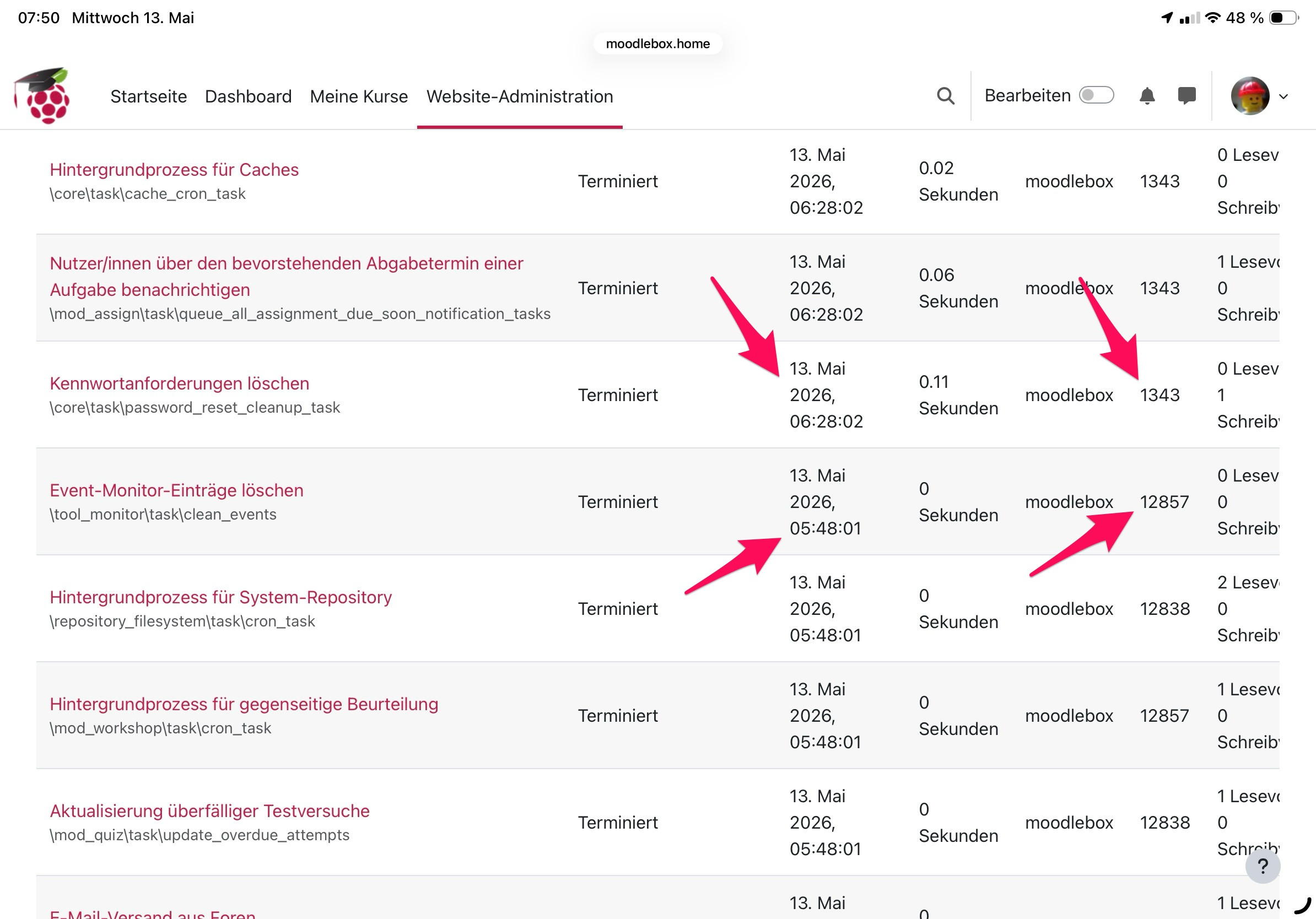
Fortunately, Moodle stores the results of its scheduled tasks within its own database. And I was able to find the exact start of my experiment. I launched the experiment—and snapped the photo of the USB tester—on May 12, 2026, at 14:43. It is at this precise moment that I find a gap in the task log data. After all, I had just unplugged the power adapter and switched to using the power bank instead ... a transition that caused the MoodleBox to reboot.
In the next step I needed to locate the next gap in the task logs to determine exactly when logging ceased—indicating that the power supply had finally failed. The very last entry—bearing PID 12857—was recorded at 05:48 on May 13, 2026. Then, at 06:28, the first entry following a system restart was recorded, this time with PID 1343. The PID (Process ID) sequence resets whenever the Raspberry Pi reboots, encompassing all active system processes. Consequently, any processes sharing the same PID within the task logs were likely triggered by the same underlying cron job.
For me, this proved to be an instructive experiment. I learned how to identify operational interruptions within Moodle—even in the absence of corresponding operating system log data. Furthermore, I now know that my MoodleBox, powered by a laptop-grade power bank, managed to run for just 15 hours. During this period, I had two devices connected to both the "MoodleBox" WiFi network and the Internet.
Armed with the insights gained from this experiment, it would be a simple matter to determine just how much additional power the MoodleBox consumes when an entire class of students is accessing it and actively engaging with a Moodle course. Another indicator for such an experiment can, of course, be the percentage display on the power bank; however, even for this, you must first test whether the MoodleBox continues to run when the display drops below 5%, below 3%, or even to 1%.
Best regards,
Ralf